
Every software product has a gap between what it looks like in the demo and what it looks like on first use. An open-source tool’s README shows a polished screenshot with rich data, but when you clone and run it, you see an empty screen. A SaaS product’s marketing page shows a dashboard full of insights, but when you sign up for a trial, you land on a blank workspace with a “Getting Started” wizard. An enterprise vendor walks you through their platform using a previous customer’s live data, and you wonder whether your data will end up in someone else’s demo next quarter.
The pattern is the same in every case: the prospective user can’t evaluate the product until they invest real effort, or real trust, first. Many give up. The ones who push through often feel misled by screenshots and sales demos that showed a polished view of data they don’t have yet.
When I was preparing synthesis-console for open-source release, I ran into this problem directly. My real project data — over 90 projects tracked, 200+ lessons — makes for compelling screenshots. But it contains client names and project details that can’t be in a public README. I could redact the screenshots, but redacted screenshots look suspicious and unprofessional. I could create throwaway data, but throwaway data looks fake and undermines the credibility of the tool.
I’ve seen this problem from the other side too. In my years as a CTO and CPO, I’ve sat through countless vendor demos where the salesperson walked me through their product using another customer’s live data. Real company names, real project details, real metrics — with no mention of whether that customer had consented to their data being used in a sales pitch. Every time it happened, it told me something about that vendor’s judgment. If they’re showing me someone else’s data today, they’ll show mine to someone else tomorrow. It’s a trust signal, and not a good one.
Demo mode solves this from both directions. As a tool author, you never risk leaking sensitive data in screenshots or presentations. As a customer evaluating a product, you can tell whether the vendor takes data handling seriously by whether they’ve built a proper demo environment or are just screen-sharing their way through another client’s account.
The solution for synthesis-console was to build demo mode as a first-class feature of the product itself.
Three audiences, one feature
Demo mode turned out to serve three distinct audiences, each with a different relationship to the tool.
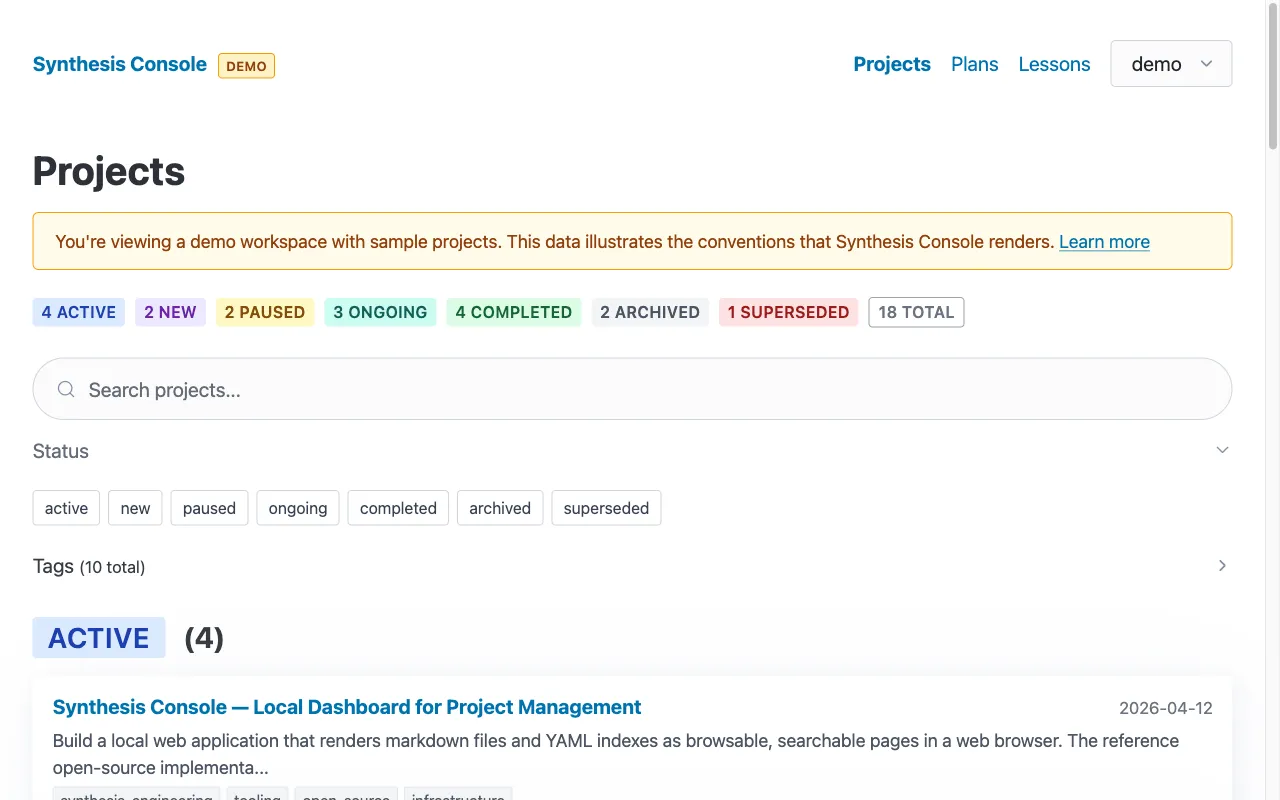
The author. I need representative screenshots for the README, blog posts, and documentation. Demo mode provides sample data that’s realistic, always available, and contains nothing that needs redacting. Screenshots become repeatable — anyone can regenerate them by running the demo and capturing the same pages. No more “I hope I didn’t leak anything in that screenshot” anxiety.
First-time users. Someone who finds the repo on GitHub can clone it, run bun run demo, and immediately see what the tool does. The project list has 18 sample projects across all seven status types. They can click through, test the search, try the filters, view a project detail page — all without configuring a workspace or creating any data. The tool demonstrates itself. If they like what they see, they create a config file and point it at their own data. If they don’t, they’ve spent two minutes instead of twenty.
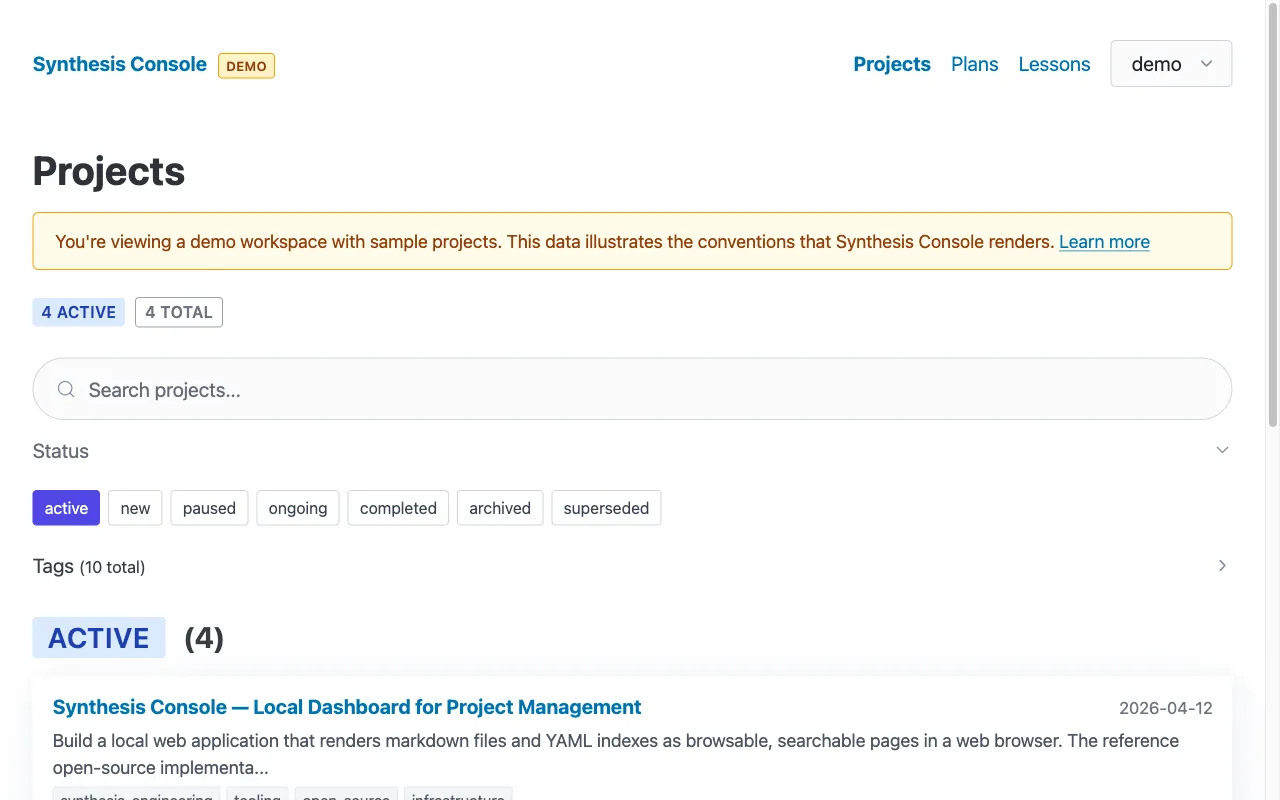
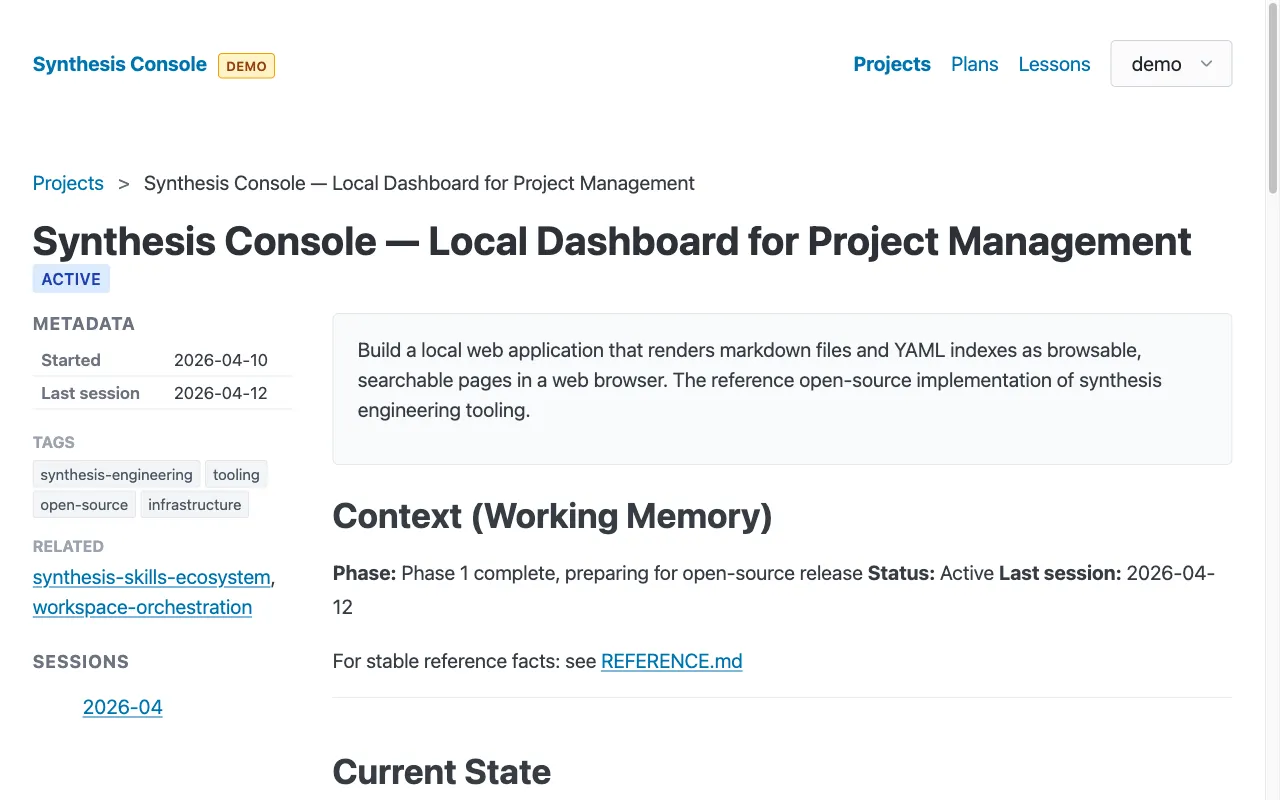
The demo data itself. This was an unplanned benefit. The sample index.yaml, the CONTEXT.md files, the lessons — they serve as documentation-by-example. A new user studying how to structure their own project data can look at the demo files and see exactly what the conventions look like in practice. The demo is both a preview and a tutorial.
Implementation
The implementation is straightforward because demo mode isn’t a separate application. It’s a data source swap.
A demo/ directory ships with the repo:
demo/
  ai-knowledge-demo/
    projects/
      index.yaml                    # 18 projects, all 7 statuses
      synthesis-console/
        CONTEXT.md                  # Working context example
        REFERENCE.md                # Reference facts example
        sessions/2026-04.md         # Session archive example
    lessons/                        # (top-level peer to projects/)
      2026-04-12-demo-mode-as-standard-practice.md
      ... (6 sample lessons)
The config loader has three paths:
- If
--demoflag is passed, use the bundled demo data - If
~/.synthesis/console.yamlexists, use the user’s config - If neither exists, auto-detect workspaces. If none found, fall back to demo mode automatically
That auto-fallback is the key to the first-time user experience. Clone, install, run — you see a working dashboard. No “error: no workspaces configured” message. No setup wizard. Just a dashboard with sample data and a “DEMO” badge in the header telling you what you’re looking at.
The demo data uses the same code paths as real data. There’s no if (demoMode) scattered through the rendering logic. The views don’t know whether they’re rendering real projects or sample projects. Demo mode is a config choice, not a code branch.
More than three audiences
The benefits extend beyond the original three. Once demo mode exists, it keeps finding new uses.
Onboarding new team members. A new developer joins the team and needs to run the application locally. Without demo mode, they need access to production data, a VPN connection, database credentials, and someone to walk them through the setup. With demo mode, they clone the repo, run it, and have a working application in front of them before their first standup. They can explore the UI, understand the data model, and start reading code — all without waiting for access provisioning.
Offline development. Demo mode works on a plane, in a coffee shop with unreliable wifi, behind a corporate firewall that blocks your staging environment. The demo data is in the repo. No network dependency means no excuses for not being able to run the application.
Automated testing. The demo fixtures are deterministic. Same data, every time. That makes them ideal for CI/CD pipelines, visual regression tests, and integration tests. You don’t need a test database or mock server — you already have a complete, realistic dataset that exercises every code path. One investment, multiple returns.
Regulatory environments. In industries with strict data handling requirements — healthcare, finance, government — showing customer data in a demo or training session can be a compliance violation. Demo mode makes compliance the default. No one has to remember to redact, because there’s nothing to redact.
Why this is becoming feasible now
The traditional cost calculation for demo mode: design sample data, write fixture loading, add a toggle flag, test that demo mode doesn’t interfere with production paths, maintain fixtures as the schema evolves. For a small open-source tool, this might be a day of focused work. For a larger application with complex data relationships, it could be a week. Reasonable people might decide it’s not worth it for a v0.1 release.
Synthesis engineering changes this calculation. AI agents can generate realistic sample data that follows your conventions and respects your schema relationships. Describe what a realistic project looks like and the agent produces twenty of them, varied across statuses, dates, and content. It writes the config loader, the CLI flag handling, the auto-fallback logic, the visual indicator. The human role shifts from writing sample data to reviewing it — checking for realism, verifying no real data leaked in, making sure the demo actually demonstrates the tool’s capabilities.
The harder part has always been the data, not the code. Writing a --demo flag is trivial. Designing thirty realistic but fictional records that look like something a real user would have? That’s the part that gets deferred. AI agents are good at exactly this kind of generative work — producing varied, realistic content that follows a pattern. The bottleneck that made demo mode feel expensive is the part that synthesis engineering handles most naturally.
When the cost of a feature drops that much, the decision calculus inverts. Demo mode stops being a “nice to have” that gets deferred to v2. It becomes a default practice — something you build before the first public commit. You wouldn’t ship a tool without a README. Why would you ship it without a way to see what it does?
Synthetic data that’s realistic without being real
There’s a deeper capability here that goes beyond generating lorem ipsum with better vocabulary.
Traditional approaches to demo data fall into two traps. Completely fictional data — random names, round numbers, uniform distributions — looks fake because it is fake. Real users don’t have exactly 10 projects in each status category. Real financial data doesn’t land on round numbers. Real customer names aren’t “Acme Corp” and “Globex Industries.” Anyone who has worked with real data can spot synthetic data that was designed by someone who hasn’t.
The other trap is anonymized production data — take real data, change the names, scramble the numbers. This is better but fragile. Change “Coca-Cola” to “Beverage Company A” and you haven’t hidden much. The industry vertical, the transaction patterns, the geographic distribution, the seasonal cycles — all of it can identify the source to anyone who knows the domain. A competitor analyst doesn’t need names to learn from your demo data. They can infer your clients’ industries from workflow patterns, your scale from data volumes, your product roadmap from which features have the richest demo coverage.
AI agents enable a third approach: study the statistical properties and usage patterns of real production data, then generate synthetic data that captures those properties without reproducing any actual records. The synthetic data feels real because it reflects how real users actually use the product — the distribution of statuses, the ratio of active to archived items, the typical length of descriptions, the way metadata fields are actually populated versus left empty. But no individual record maps back to a real customer.
The more powerful part is multi-perspective review. After generating the synthetic data, you can run AI agents through it from different adversarial viewpoints. Have one agent review it as a competitor’s analyst looking for market intelligence. Have another review it as a journalist looking for a story. Have a third review it as a client’s legal team checking whether their data was used as a basis. Each perspective catches different categories of leakage that a single reviewer would miss. A name change catches the obvious. A competitor-perspective review catches the structural — “this demo has a healthcare workflow with Medicare billing codes, so at least one of their customers is a US healthcare provider.” A legal-perspective review catches the pattern-level — “these transaction volumes and seasonal patterns match publicly reported figures for Company X.”
This kind of multi-pass adversarial review was impractical when each pass required a human expert. With AI agents, it’s a standard part of the demo data generation pipeline. Generate, review from five perspectives, flag concerns, regenerate the flagged records, review again. The result is demo data that’s realistic enough to be convincing and safe enough to show anyone.
What demo mode reveals about your architecture
Here’s something I didn’t expect: building demo mode taught me more about my architecture than any code review.
Demo mode is dependency injection at the product level. You’re swapping the entire data source while keeping every code path identical. If that swap is clean — a config change, a directory pointer — your architecture has good separation between data and presentation. If it requires touching dozens of files, adding conditional branches, or mocking out services, your architecture is telling you something about its coupling.
Think of it as a litmus test. The question “can I add demo mode in an afternoon?” is really asking “is my data access cleanly separated from my business logic and rendering?” If the answer is no, you have an architecture problem that will surface in other ways too — in testing, in migration, in scaling. Demo mode just makes the problem visible faster.
For synthesis-console, adding demo mode took about thirty minutes. The config loader already pointed at a directory path. Demo mode was just another directory. The views already rendered whatever data the parsers returned. The parsers didn’t care where the files came from. That clean separation wasn’t accidental — it’s a natural consequence of the file-based architecture — but demo mode confirmed it. If it had been painful, I would have learned something important about where the architecture needed work.
Demo data as living specification
There’s a product management insight buried in demo mode that’s easy to miss.
Your demo data is an executable specification of your product’s value proposition. It answers the question “what does this product look like when it’s delivering value?” in a way that no product requirements document, wireframe, or user story can match. A PRD says “users can filter projects by status.” The demo data shows what that actually looks like with eighteen projects across seven statuses, with realistic names, dates, and descriptions.
This makes demo data a communication tool between product and engineering. When a product manager says “the dashboard should feel rich and useful,” they can point to the demo and say “like this.” When a designer proposes a new layout, they can test it against the demo data and see whether it holds up with realistic content lengths and edge cases. When a new engineer asks “what is this product supposed to do?” the demo is the answer.
The demo data also functions as a canary for feature completeness. If you can’t represent a capability in the demo, either the capability doesn’t work well enough to show, or the demo data needs updating. Either way, the gap between “what the demo shows” and “what the product can do” is worth tracking. A feature that works but can’t be demonstrated has a presentation problem. A feature that’s in the roadmap but can’t be demoed yet has a prioritization signal — it isn’t real until it’s in the demo.
Model homes work the same way in real estate. A model home isn’t just marketing — it’s a specification. The builder’s design team uses it to validate layouts. The sales team uses it to set expectations. Buyers use it to evaluate whether the floor plan works for their family. The model home is a shared reference point that everyone can walk through, and demo mode serves the same function for software.
The broader principle
Software should be self-demonstrating.
This isn’t a new idea, and the best examples span both open-source and commercial products. SQLite ships with a sample database. Grafana has built-in test data sources. Obsidian creates a help vault on first run. VS Code opens with a welcome tab showing its features. On the commercial side, Stripe’s test mode is the gold standard — every API endpoint works identically in test and live modes, with a visible toggle and test credit card numbers. Developers can build and test a complete integration without any real money flowing. Figma starts new users with sample design files. Notion populates fresh workspaces with template content.
The pattern exists across every category of software. But it’s under-applied, especially in smaller tools, internal applications, and early-stage products where the team focuses (reasonably) on functionality over onboarding. Internal tools are the worst offenders — built for a specific team, never expected to onboard strangers, so demo mode feels unnecessary. Then someone from another department asks to try it, or a new hire joins, or the team lead needs screenshots for a presentation to leadership. Every time, the same scramble to sanitize production data or create sample content from scratch.
Synthesis engineering shifts the economics. When adding demo mode is cheap, “every product ships with a working demo” becomes a feasible standard, not an aspirational one. And the return on that investment compounds: better screenshots for READMEs and sales decks alike, lower abandonment at the evaluation stage, documentation-by-example that stays current because it’s part of the product.
Making it work
If you’re adding demo mode to your own tool, a few implementation notes from what I learned:
Realistic data, not lorem ipsum. Fake data undermines the demo. If someone sees “Project Foo — Lorem ipsum dolor sit amet” they’ll assume the tool is also low-effort. Use data that could plausibly be real.
A flag, not a default. Demo mode should be opt-in or a fallback. Users with real data should never accidentally see demo data. A visible indicator (we use a “DEMO” badge in the header) makes the mode obvious.
Bundled, not fetched. The demo data ships with the repo. No network dependency. Works offline, works behind firewalls, works when GitHub is down.
Same code paths. The demo should exercise the same rendering logic as production. If you have a separate code path for demo mode, you’re maintaining two applications and the demo will eventually drift from reality.
The demo data is also test data. If you add automated tests later, the demo fixtures are ready-made test data with known, deterministic content. One investment, multiple returns.
Whether you’re building an open-source tool, a SaaS product, or an internal application for your team, the same question applies: can someone experience your software without bringing their own data first? If not, you’re asking them to invest before they can evaluate — and most won’t.
The code for synthesis-console, including the demo mode implementation, is at github.com/rajivpant/synthesis-console. Run bun run demo and see for yourself.